
Would you like to redirect your calls from Etisalat to another line? It is possible to redirect incoming calls when you are busy and don’t answer the phone, or you wish to forward all incoming calls to another number with the Etisalat Call Forwarding feature. Enabling the forwarding option is as easy as inputting a code on your phone.
This guide explains how to use Etisalat Call Forwarding activation and Deactivation codes, as well as codes for forwarding all calls, forwarding calls when busy, and forwarding calls when there is no answer.
What Is Etisalat Call Forwarding?
Call Forwarding for Etisalat is a service that enables clients to redirect an incoming call from an Etisalat phone number to another phone number.
You need calls to be redirected to another number when you aren’t available, or you may only want calls redirected when your Etisalat line is busy.
Etisalat Call Forwarding Codes
To configure Call Forwarding, follow the method outlined below:
| Call Forwarding Type | Activation Code | Deactivation Code |
|---|---|---|
| Forward all calls | *21*05XXXXXXXX# | #21# |
| Forward when busy | *67*05XXXXXXXX# | #67# |
| Forward when no answer | *61*05XXXXXXXX# | #61# |
| Forward when switched off/unreachable | *62*05xxxxxxxx# | #62# |
How to Activate Etisalat Call Forwarding
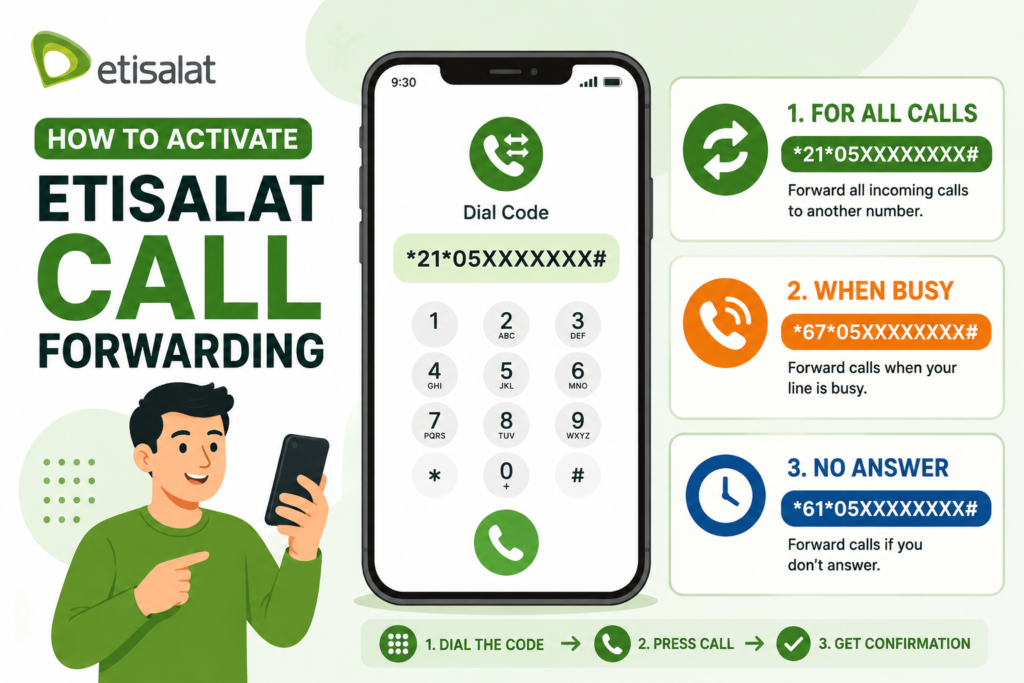
1. Activate Etisalat Call Forwarding for All Calls
Use the following code to make all incoming calls forward to another number:
Activation Code
*21*05XXXXXXXX#
How to Activate It
Follow these steps:
- Open the Phone or Dialer app on your mobile.
- Enter
*21*05XXXXXXXX#. - Replace
05XXXXXXXXWith the number where you want to receive the forwarded calls. - Press the Call button.
- Wait for the confirmation from the network.
2. Activate Etisalat Call Forwarding When Busy
If you need to forward the line only when your Etisalat number is busy, then use:
Activation Code
*67*05XXXXXXXX#
May be useful when already on the phone and don’t want another incoming call to ring.
How to Activate Busy Call Forwarding
- Open your phone’s dialer.
- Enter
*67*05XXXXXXXX#. - Replace with the destination number.
- Press the Call button.
- Wait for the activation confirmation.
3. Activate Etisalat Call Forwarding When There Is No Answer
Use the following code:
Activation Code
*61*05XXXXXXXX#
How to Activate No-Answer Call Forwarding
- Open the Phone app.
- Enter
*61*05XXXXXXXX#. - Replace with the destination number.
- Press the Call button.
- Wait for the activation confirmation.
Etisalat Call Forwarding Deactivation Codes
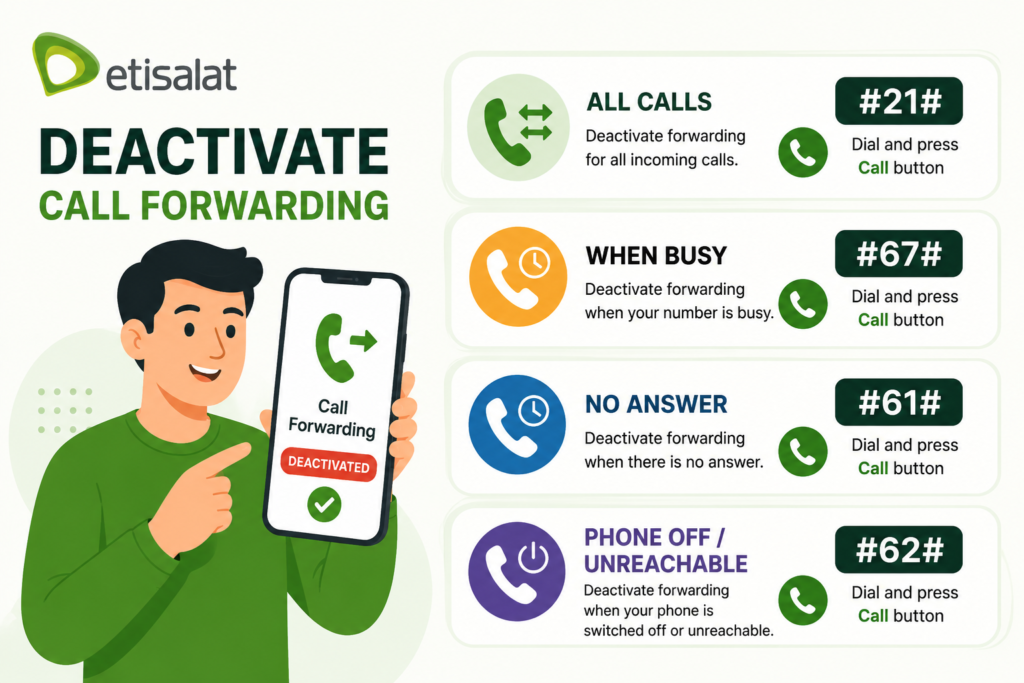
Apply the code you used for the forwarding service that you had activated before.
| Forwarding Type | Deactivation Code |
| Forward all calls | #21# |
| Forward when busy | |
| Forward when no answer | |
| Forward when switched off/unreachable | |
Deactivate Forwarding for All Calls
If you previously activated forwarding for all incoming calls, dial:
#21#
Then press the Call button.
This is the deactivation code for the all-calls forwarding option.
Deactivate Forwarding When Busy
Your calls are forwarded when the number is busy; if you set up forwarding, dial:
#67#
Press the Call button to deactivate the busy forwarding option.
Deactivate Forwarding When There Is No Answer
To stop forwarding calls when you do not answer, dial:
#61#
Then press the Call button.
Deactivate Forwarding When Your Phone Is Switched Off or Unreachable
To turn off or disable the forwarding that has been programmed into an “off” or “unreachable” phone:
#62#
Then press the Call button.
Etisalat Call Forwarding Not Working? Try These Steps
Not sure what’s still switched on? You can check each type from your dialler: *#21# shows all-calls forwarding, *#67# busy, *#61# no answer and *#62# unreachable. These are standard GSM codes, so they work on most phones on the e& network.
If the call forwarding is not occurring, then check to make sure you have the proper code.
1. Check the Forwarding Code
Make sure every symbol is entered correctly.
For example:
*21*05XXXXXXXX#
2. Check the Destination Number
Be certain of your entry of the number.
If the destination number is entered incorrectly, your calls could end up on the wrong phone.
3. Choose the Correct Forwarding Type
Consider your needs and objectives.
- Use all-calls to set up an all-calls number.
- You only have to use busy if the redirecting service needs to be done only when you’re already in a call.
- Use an “unanswered” feature, which routes calls when they are not answered.
4. Check Whether Forwarding Is Still Active
If you did previously set up a forwarding option, but have changed your needs, ensure that you disable the previous one with the right forwarder code.
5. Try Again Carefully
Enter the number once again, and be sure to confirm the number going to.
Frequently Asked Questions (FAQs)
What is the Code for Call Forwarding on Etisalat?
You can use these forwarding codes: *21*05XXXXXXXX# (All the calls), *67*05XXXXXXXX# (When busy) and *61*05XXXXXXXX# (when there is no answer).
How do I activate Etisalat Call Forwarding?
Dial the code for the forwarding type you want, e.g. *21*05XXXXXXXX#, then press Call.
How to set up ALL FORWARD TO Calls on Etisalat?
Dial *21*05XXXXXXXX# and replace the placeholder with the number.
What is the Etisalat forwarding code in case of a busy line?
To pass on calls when the Etisalat telephone number is busy, use the dial key as *67*05XXXXXXXX#.
Read More: Update Iqama in SNB Online: Everything You Need to Know
More e& help: Etisalat balance check codes, reaching Etisalat customer care, and checking your Etisalat number.
Final Thoughts
With Etisalat Call Forwarding, you can easily forward calls when you don’t want to receive them on your main number. A short dial code switches it on for all calls, only when you’re busy, when you don’t answer, or when your phone is unreachable.
It is recommended to double-check the destination number on all calls to activate the service and be sure to call the forwarding option that corresponds to the needs.