Last updated: September 2026 – prefix list corrected and app name updated for e&.
Forget your Etisalat phone number? You can use the shortest Etisalat number check code of *101# and follow the prompts to check your SIM within just a few seconds. From your Etisalat/e& UAE number dial *101# from the SIM, and follow the prompts to open up the Account Management, choose Account Information, and then Know My Number. Your mobile number then pops up on the screen.
This guide will describe three official and working methods of checking your Etisalat number easily and quickly:
- Using a USSD code
- Using the Etisalat website
- Using the Etisalat mobile app
Each of them has a step-by-step explanation, is for users of UAE Etisalat, and can work with both prepaid and postpaid SIMs. The fastest option is to begin with.
Etisalat Number Formats
Etisalat mobile numbers follow a standard and an official format, which is regulated by the Telecommunications and Digital Government Regulatory Authority (TDRA) in the UAE.
Standard Etisalat Mobile Number Format
The mobile number at Etisalat in the UAE typically looks as follows:
05X XXX XXXX
Where:
- 05 → UAE mobile prefix
- X → Etisalat-specific network code
- XXX XXXX → Subscriber number
Common Etisalat Prefixes
A quick word on prefixes: since the UAE introduced number portability, people can switch operators and keep their number. A 050 or 056 number could now run on du, and a du number could be on e&, so the USSD check or the e& UAE app on that SIM is the only reliable way to be sure.
Etisalat numbers are usually begin with:
- 050
- 054
- 056
When a UAE mobile number begins with one of the following prefixes, it was most likely issued by e&, though ported numbers may have moved to another network.
Method 1: Using USSD Code
It’s the quickest and most reliable option. It is not an internet-based application and is compatible with nearly all phones.
What Is a USSD Code?
USSD codes are the short dial codes that can be used to communicate directly with the Etisalat network and allow access to SIM-related data.
USSD Codes to Check Etisalat Number
*101#*101*1*3*3#
Step-by-Step Guide
- Open the Phone Dialer on your mobile.
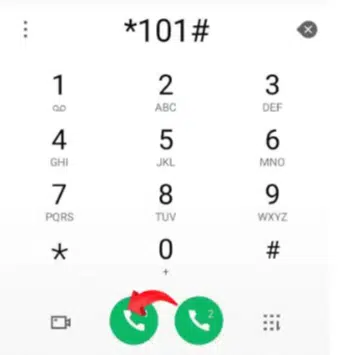
- Dial
*101#.
- Dial
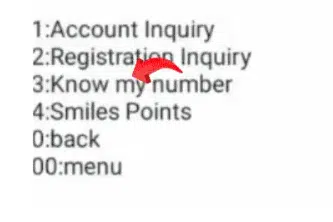
- Select Account Management and select 1, and press send.

- Select Account information, type 3, and click on send.
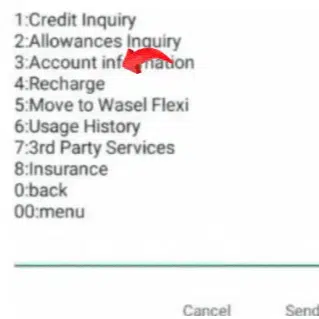
- Select Know my number and type 3, and click on Send.
- Tap the Call button.
- Wait a second.
- Your mobile number with Etisalat will be displayed on the screen.
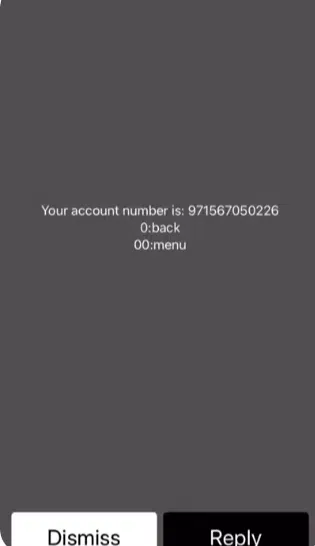
In case the number is not displayed, dial *101# and pick the menu on the screen.
Read Also: Etisalat Quick Pay UAE: No Login Recharge Guide (2026)
Using Direct Code
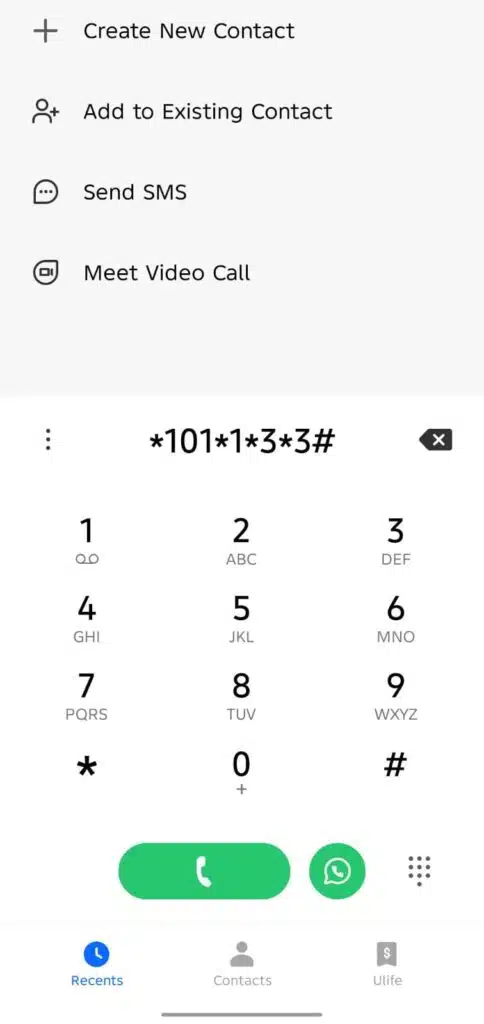
- Dial *101*1*3*3# and call it, then the number will show.
Best For
Anyone who needs their number fast and has no mobile data.
Method 2: Using the Etisalat Website
In case you want to use a browser or handle your account on the internet, this approach is beneficial.
Steps to Check via Etisalat Website
- Open a browser on your phone or computer.
- Visit the official Etisalat UAE website.

- Click on “My Account” or Sign In.
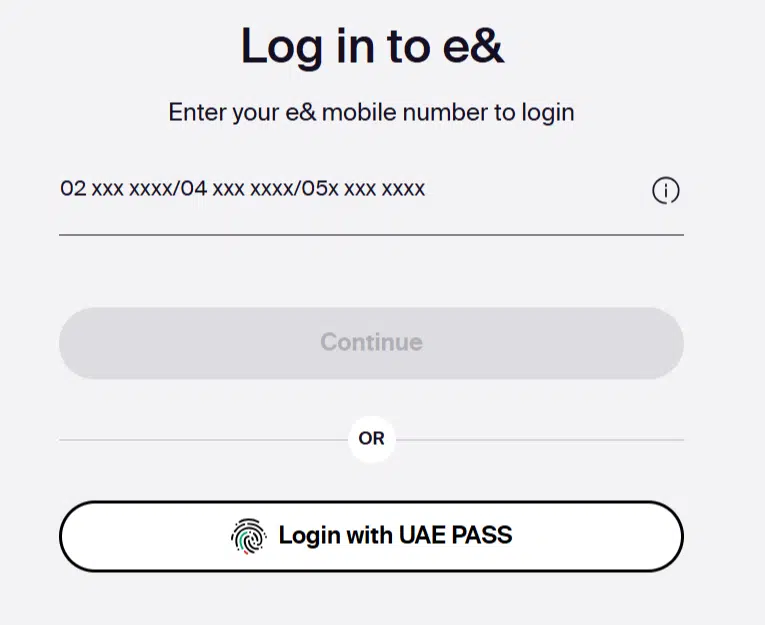
- Log in with your registered details or UAE Pass.
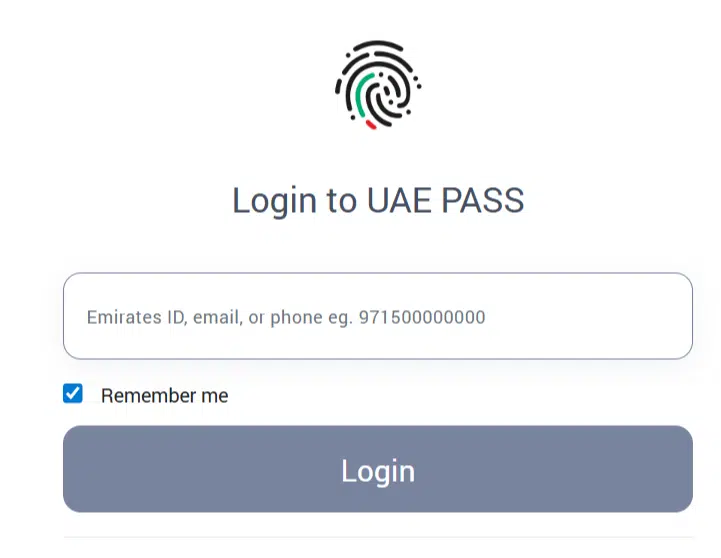
- After getting into the account, your Etisalat number is set to appear on the dashboard.
When This Method Is Helpful
- You manage multiple Etisalat lines
- You want to confirm that you are the owner of the account.
- You are already customers of the online services of Etisalat.
Method 3: Using the Etisalat App
It is the simplest way to do it if you use the Etisalat mobile application.
Steps to Check Using the Etisalat App
- Install the e& UAE app from Google Play, the Apple App Store or Huawei AppGallery.
- Open the app and log in.
- Your Etisalat number will be displayed on the home screen or in the profile section.
- Usage, billing, and balance details could also be viewed.
Advantages
- Easy interface
- Everything about the accounts is in a single location.
- Perfect for the frequent Etisalat customers.
Best For
The users who require a long-term option to manage their Etisalat account.
Comparison: Which Method Is Best?
| Method | Internet Needed | Speed | Ease |
|---|---|---|---|
| USSD Code | No | Very Fast | Easy |
| Etisalat Website | Yes | Medium | Moderate |
| Etisalat App | Yes | Fast | Very Easy |
Recommended: Use the USSD code if you need your number instantly.
Read Also: Activate Du 50 AED 28GB Package Instantly (*135*5#)
Common Problems and Solutions
USSD Code Not Working
- Check the network signal
- Restart phone
- Try the alternative code
App Login Issues
- Update the app
- Reset password
- Check the internet connection
Wrong Number Displayed
- Ensure the correct SIM slot
Frequently Asked Questions (FAQs)
How do I confirm my Etisalat number when it has no balance?
The USSD code normally works even with zero balance.
Is this applicable to prepaid and postpaid Etisalat SIMs?
Yes, all methods work for both.
Is it possible to check my Etisalat number when I am offline?
Yes, the USSD method works offline.
What is the time to display the number of a new SIM?
Usually soon after activation – if it isn’t showing, restart your phone and try again.
Read Also: Etisalat Customer Care UAE: Talk to a Live Agent Fast
Related e& guides: Etisalat balance check, Etisalat call forwarding codes, and renewing your Etisalat SIM online.
Final Words
It is not that difficult to check your Etisalat number in a few seconds, provided you know how to do it. The USSD code is the quickest, the Etisalat application is the most comfortable, and the website is effective in managing the account.
Select the way of doing things that suits you, and you will never have a problem getting your Etisalat number back.