
Are you thinking of going out of Saudi Arabia on a short trip? As a resident holding a good Iqama, you will need to obtain an Electronic Exit Re-Entry Visa (Single) to leave and come back home without problems. Such a form of visa enables you to leave the Kingdom once and arrive back within the prescribed time limit, mostly not more than 60 days. Be it a dependent, a domestic worker, or one sponsored by the company, I have listed the best options to use: through Absher, Muqeem, or even at the Jawazat office (special cases).
In case you are interested in a quick, clear, and comprehensive solution to the issue, check or printing of your single exit re-entry visa, you are in the right place. Here goes!
What is a Single Exit Re-Entry Visa?
The Single Exit Re-Entry Visa permits you (being an Iqama holder) to visit the outside and come back to Saudi Arabia once during a stipulated period. The visa has a limited period of up to a stay of 60 days per trip, and dependents, domestic workers, and employees are the most common users.
Method 1: Apply via the Absher Platform
Step-by-Step Process
Log in to Absher
- Visit the official page: https://www.absher.sa
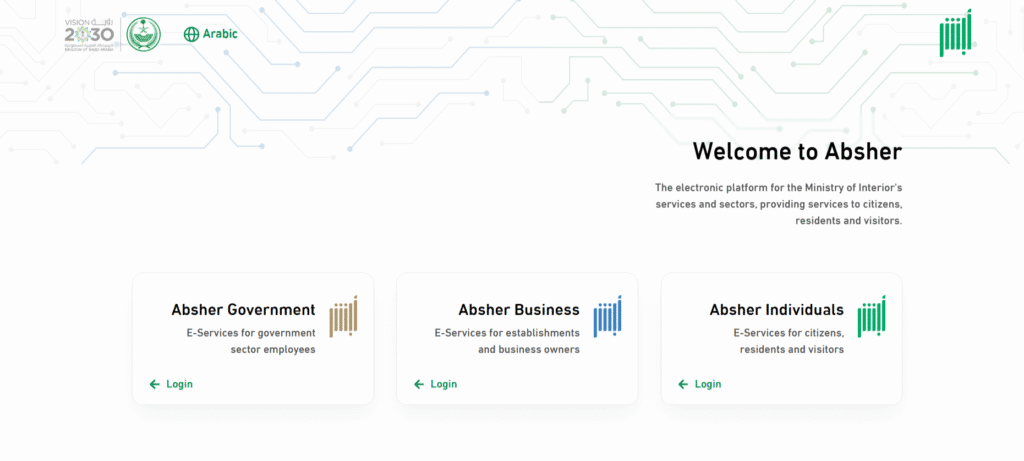
- Tap on Individuals.
- Log in using your registered username and password
Go to ‘My Services’
- Click on the main dashboard in My Services.

Select ‘Issue Exit Re-Entry visa
- Open the Passports section and choose the exit/re-entry visa service
- Select the option of exit and re-entry as a single
Set Duration

- Enter how many days you’ll be away – longer trips carry a higher fee
Confirm Terms and Conditions
- Read and accept the terms
- To continue, press submit
Pay the Fee
- Visa Fee: SAR 200, single-entry visa
- A link for transferring through your bank account via the SADAD service:
Download and Print Visa
- When the visa is issued, you can obtain it to download or print via:
- Absher platform
- Muqeem portal for a printout backup
Read Also: New Iqama Issued or Not? 3 Easy Ways to Check (2026)
Method 2: Apply via Muqeem Portal
In a case where you are under a company sponsorship, the Muqeem Portal is the Medium through which your employer or their HR department will apply to be issued your Exit Re-entry Visa.
Step-by-Step Process
Go to Muqeem Portal
- Visit the official site: https://muqeem.sa

Log in with Employer Credentials

Enter Duration

- Set the travel period on the visa (the fee rises for longer periods)
Verify and Pay
- Pay SAR 200 SADAD fee.
- Verify all details
Print Visa
- Once authorized, the company can print and download the visa

Method 3: Jawazat Office
Not all that common in modern times, there might be special or urgent circumstances leading to manual filling out in a Jawazat office.
Step-by-Step Process
Download Visa Form
- Download the official Exit Re-Entry Visa Form
- Available from Jawazat office, official websites

Attach Required Documents
- Attach:
- Copy of Iqama
- Passport copy
- Letter from sponsor/employer
- Proof of payment (via SADAD)
Visit Jawazat
- You should visit the closest Jawazat branch in your city
Submit Documents
- Put the full package of paperwork into a counter desk personally
Receive Visa
- In case all was fine, you will get a manual printed visa
Important Points You Should Know
Visa Validity
- Up to 60 days, each issue is valid
- You are only allowed to come back before the expiry date; otherwise, you might be fined
Extension Option
- A single re-entry visa can usually be extended online while you’re still outside Saudi Arabia
- The sponsor should request an extension either in Absher or Muqeem
Travel Conditions
- The visa is valid only once: if you return before expiry and want to leave again, a new visa must be issued
Frequently Asked Question
What is an electronic exit re-entry visa single?
A Single Exit Re-Entry Visa enables a resident to travel outside and come back to Saudi Arabia once within a maximum of 60 days.
How much does a single exit re-entry visa cost?
The base fee is commonly SAR 200, and longer durations cost more – check the amount Absher shows before paying.
How can I check my exit-re-entry visa?
You can check it on the Muqeem portal https://muqeem.sa
How can I print an exit re-entry visa to print my own?
Visit Absher.sa, visit Visa Services, and download /print your visa once received.
Where could I print out a visa copy?
Go to Muqeem portal → Enter your information → Click “Print Visa”.
Read Also: Check Zain Bill on Iqama in 2026: 3 Easy Methods
Before you travel: check your Iqama expiry date, clear any Iqama fines, and see how to book a Jawazat appointment if you need help in person.
Final Thoughts
Speaking from experience, I’ve used the Absher method to apply for the visa for my client. It was fast, effective, and saved much of the time. As a sponsor, dependent, or employee, the process will be smooth under the above steps.
I would always advise that such kind of services be done through official means, such as Absher or Muqeem mechanisms. Use as little of an agent or third-party services as possible. The rest is to apply for your Single Exit Re-Entry Visa. Now that you have all the details, apply without a hassle.
In case you still have some problems, please contact the Jawazat helpline or visit their official website to get the most recent information.