Last updated: September 2026 – working days, timings and FAQs clarified.
Do you want to book a Jawazat appointment with Absher without any confusion and mistakes? Most government services in Saudi Arabia concerning Iqama, visa, and passport issues would necessitate a reserved appointment in the Jawazat (General Directorate of Passports) prior to coming to the office. This is a complete online-based system that is conducted online via the official Absher website, making it simpler, quicker, and more systematic for both residents and expatriates.
This article will teach you a step-by-step procedure that will allow you to make a Jawazat appointment using the Absher site and provide the necessary characteristics, frequent problems, and how-it-works solutions.
What is Jawazat in Saudi Arabia?
Jawazat (General Directorate of Passports) is a government department, part of the Ministry of Interior in Saudi Arabia. It handles any residency and passport services of expatriates and citizens.
Some of the major services are:
- Iqama issuance and renewal
- Exit re-entry visa services
- Sponsorship transfer
- Passport and travel document services
- Amendment of personal data.
In order to utilize these services, an appointment made with Absher is obligatory in the majority of situations.
Requirements
It is important to remember that you should have:
- Active Absher account (Absher Individuals)
- Valid Iqama
- Registered mobile number linked to Absher
- Proper personal information on the Absher profile.
The booking process can fail or indicate errors in the absence of these requirements.
Book Jawazat Appointment via the Absher Website
Step 1: Open the Absher Website
Access the official Absher portal:
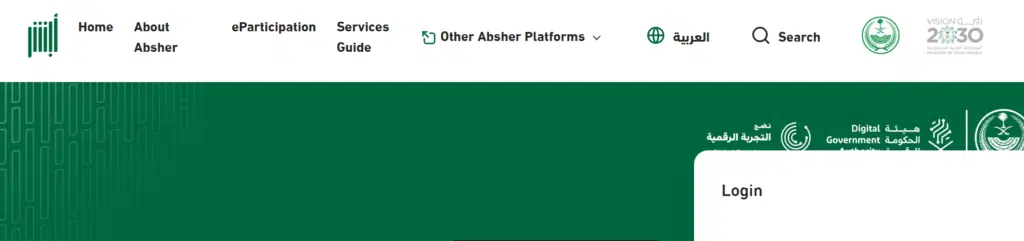
On loading the home page, choose:
- “Absher Individuals”
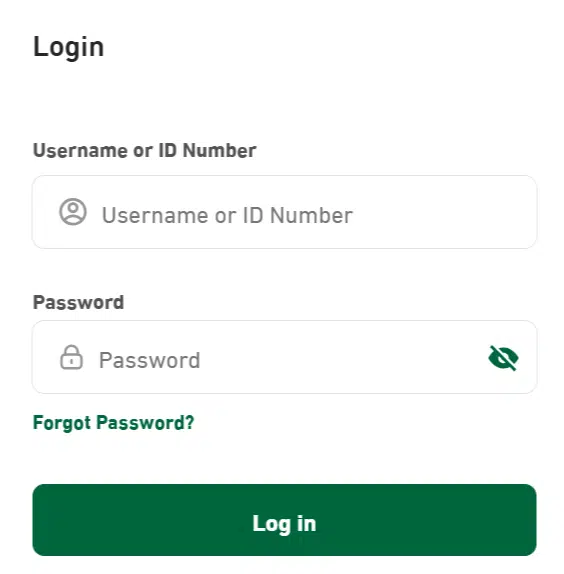
Step 2: Log in to Your Absher Account
Please enter your Logins:
- Username / ID Number
- Password
- Verification code (OTP sent to registered mobile)
Click “Login”
Step 3: Go to the Appointments Section
After logging in:
- Select the dashboard menu of Appointments.
- A list of the government departments will be presented.
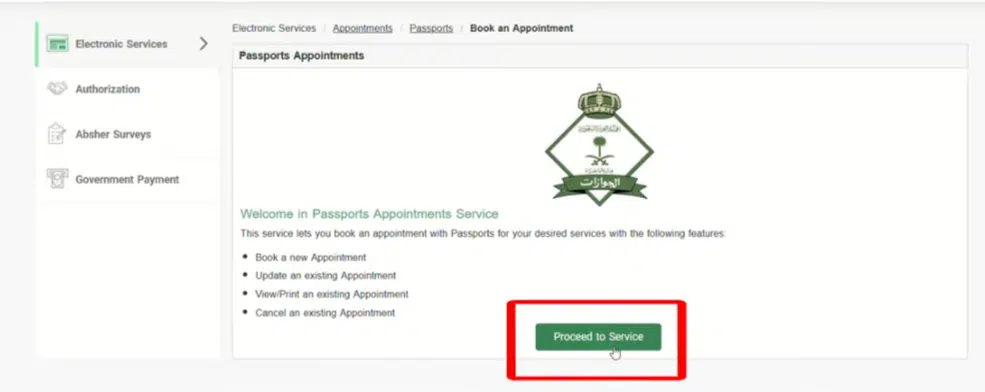
Step 4: Select “Jawazat” (Passport Services)
Out of the list of services:
- Choose “Jawazat (General Directorate of Passports)”
This is where all the services dealing with passports and residency are done.
Step 5: Select Service Type
You are now going to witness several service choices based on your requirement, such as:
- Iqama services
- Visa services
- Passport services
- Residency-related updates
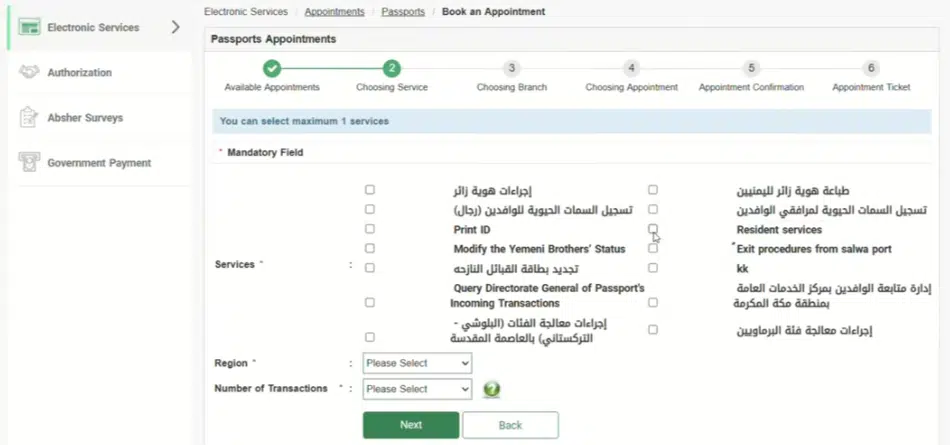
Choose the service that is needed.
Step 6: Choose Your Region and Branch
Now select:
- Your city or region
Depending on your choice, the system will display the presence of available branches.
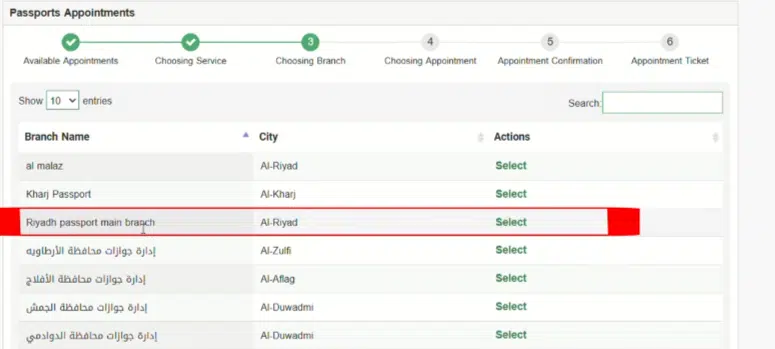
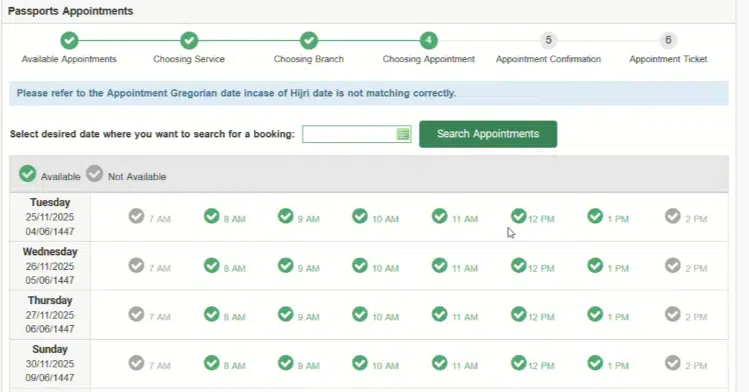
Step 7: Select Date and Time Slot
Once the branch is selected:
- Dates of appointments will be shown.
- Choose an appropriate date.
- Select a time slot.
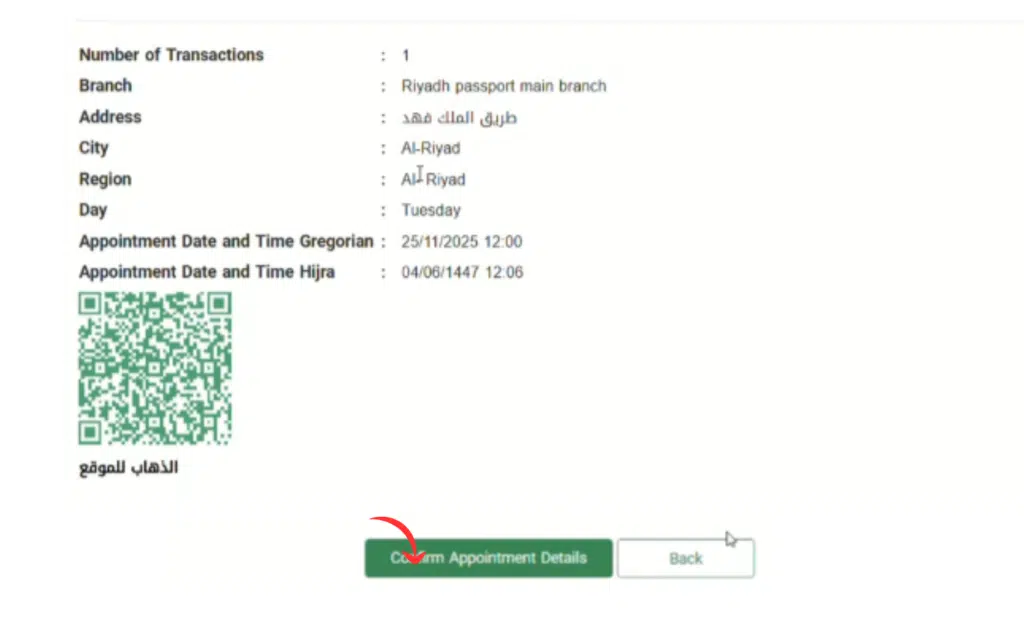
Step 8: Confirm Appointment
After selecting time:
- Review your details
- Click “Confirm Appointment”
You will receive a confirmation message and appointment slip.
Step 9: Save Appointment Details
Before you head out, check the office timings. Jawazat branches usually open Sunday to Thursday, roughly 8am to 2:30pm, with shorter hours during Ramadan and Eid. Arrive 10–15 minutes early with your original Iqama, passport, the appointment slip and any documents your service needs. Miss your slot and you’ll normally have to book a new one on Absher.
After confirmation:
- Get your appointment slip and download it or take a screenshot.
- Have it prepared when at the office.
In the absence of proof of appointment, one may not be admitted.
Common Problems & Solutions
There are many customers who have difficulties with Jawazat appointments. These are the most prevalent problems and solutions.
1. No Available Appointments Showing
Problem:
The user will not be able to view any dates or time slots available.
Solution:
- Attempt to book early-morning.
- Check again and refresh the page.
- Choose another branch or city of Jawazat.
- Try other working days (Sunday to Thursday) – Friday and Saturday are the weekend, so there are no slots then.
2. Absher Login Not Working
Problem:
The user is unable to log in or the OTP is not sent.
Solution:
- Test the phone network signal.
- SIM should be on and connected to Absher.
- Reboot the phone and re-login.
- Change the Absher password when necessary.
3. Appointment Option Not Visible
Problem:
The option of Jawazat is not shown in the appointment list.
Solution:
- Ensure that you have logged in to Absher Individuals.
- Look to see whether your Iqama is valid.
- Change Absher profile information.
- Attempt to use a different browser.
4. Wrong Service Selected
Problem:
User picks an improper Jawazat service and is refused in the future.
Solution:
- Select the service name carefully.
- In case of an error, reschedule and make the correct booking.
- Check the requirement and verify.
5. Website Not Loading or Slow
Problem:
Sites like Absher is not responding.
Solution:
- Be on an internet connection.
- Use an up-to-date browser such as Chrome, or switch to the Absher app.
- If the site is slow, try again outside peak evening hours.
- Refresh or reopen a web page.
FAQs About Jawazat Appointment Booking
Am I able to reserve a Jawazat appointment without Absher?
No, booking most of the time needs Absher.
Are Jawazat visits mandatory?
Not always. Many services run fully online through Absher, but some things – fingerprinting, for example – still need an in-person visit.
Can my appointment be rescheduled?
Yes, the option of cancellations and rearranging a different slot with Absher is available.
When should I make an early booking?
Book a few days ahead if you can – slots at busy branches fill up fast, especially early in the week.
Read Also: Saudi Driving License: Easy Steps, Fees & Apply Guide
Common reasons people book a Jawazat visit include changing the nationality on an Iqama and sorting out a border number that isn’t showing in Absher. Make sure your Iqama is valid first with our Iqama expiry check guide.
Final Words
It is not difficult to make a Jawazat appointment using Absher as long as you do it in the right sequence. The official Absher site will help you book your appointment for iqama, visa, and other passport-related services with ease, without having to undergo long queues and needless delays.
The following guide will provide you with a full, easy, and smart idea to accomplish your booking without confusion.