Do you want to know how to check your Qatar ID online? A Qatar ID (QID) is one of the most valuable pieces of documents that you have in Qatar. Banking, healthcare, employment, visa processes, and most of the services people encounter in their day-to-day activities require it. It might cause you to pay fines, miss services, or even delay official processes in case it goes out of time without your notice.
In this guide, you’ll learn exactly how to use both the MOI website and the Metrash2 app to check your QID validity, along with step-by-step instructions, FAQs, and solutions to common issues. BY using the Qatar ID validity:
- The MOI Website
- The MOI App (Metrash2)
Qatar ID Check
Verify your QID validity instantly
Check Qatar ID Validity Online (MOI Portal)
Steps to Check Qatar ID Validity on the MOI Website
Follow these steps:
- Go to the MOI website.
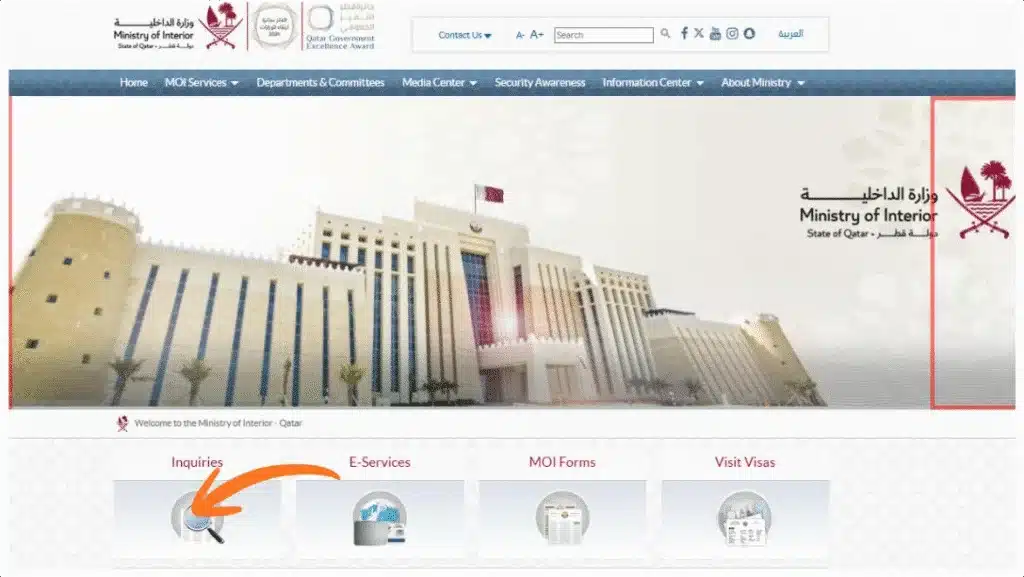
- Go to the “Inquiries” section.
- Select an official document from other inquiry section.
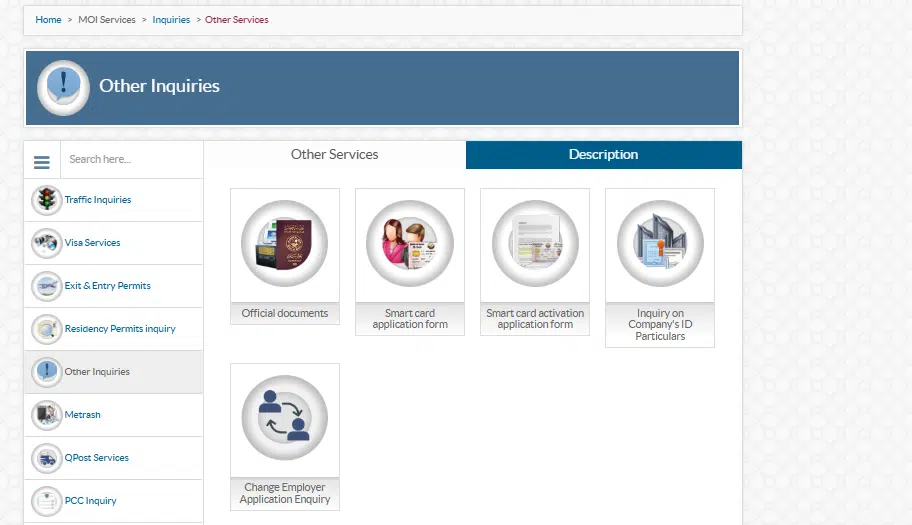
- Go to official document services and enter your QID number (11 digits).
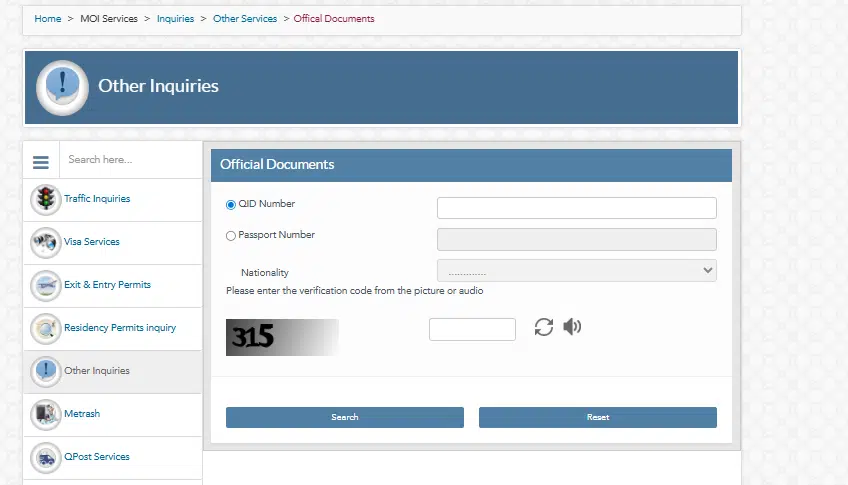
- Complete the CAPTCHA or security code.
- Click “Submit”.
- You will read everything, such as:
- QID expiry date
- Residency status
- Passport details
- Sponsor name
- Validity confirmation
- You will read everything, such as:
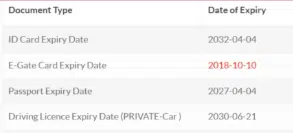
This is the surest method since the outcome is obtained in the MOI database.
Why This Method Is Best for You
- It is official and fully updated.
- You don’t need a login or password.
- You can check from any device.
- It works instantly and shows full details, not just the expiry date.
If you are a new resident in Qatar, this should be the first method you learn.
Use the MOI App (Metrash2)
Installation of the Metrash2 App
You can download it from:

After installation:
- Register using your QID number.
- Verify with your mobile number (registered with QID).
- Set a password.
After logging in, you are able to use dozens of MOI services.
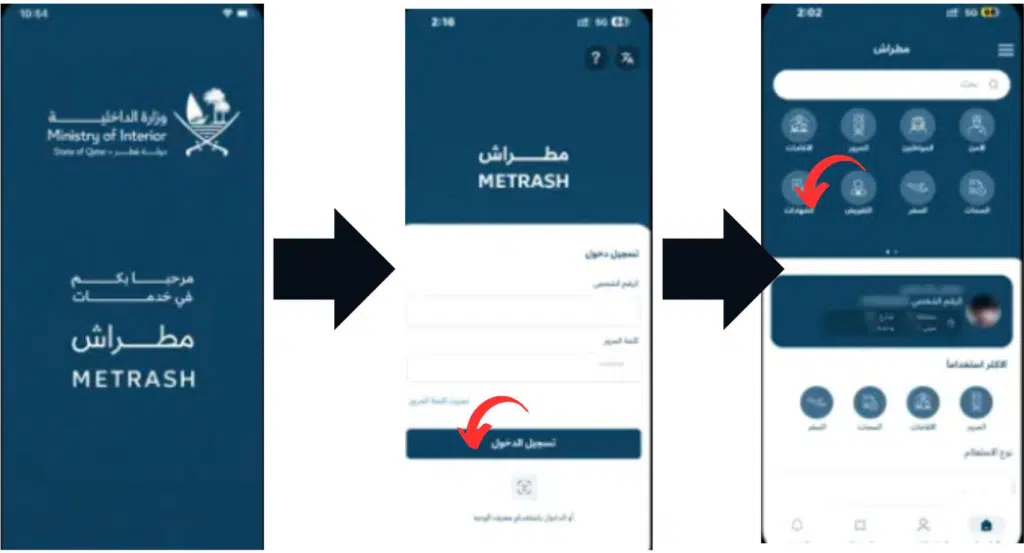
Qatar ID Validation Check in Metrash2
- Open the Metrash2 app.
- Tap “Residency Services”.
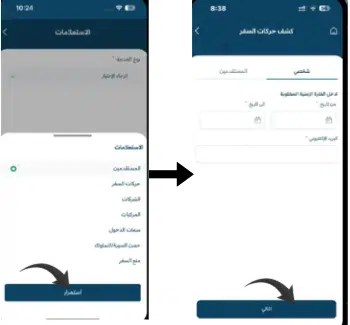
- Select Residency Information.
- Insert your QID number (when viewing the QID of another person).
- See your QID details, such as:
- Validity
- Expiry date
- Sponsor details
- Residency status
Advantages of Metrash2 in QID Checking.
- You receive real-time updates on when your QID is about to expire.
- It is possible to renew your residency rights within the app.
- You are able to verify QIDs for your dependents and family members.
- You do not have to have a computer; you can do it with your phone.
This mode suits you well in case you love using your phone to do everything.
Read Also: Check Qatar Health Card Status Fast (Hukoomi + HMC Guide)
Common Problems When Checking Qatar ID Validity
Invalid QID Number
✔ Ensure all 11 digits are entered correctly
CAPTCHA Error
✔ Refresh the page and retry
MOI Website Not Loading
✔ Try again later or switch browsers
Metrash2 Login Issues
✔ Ensure your mobile number is registered with QID
Details Not Updated
✔ Contact your sponsor or visit an MOI service center
These fixes prevent unnecessary panic and delays.
What to Do If Your Qatar ID Is Expired
If your Qatar ID has expired, act immediately.
Immediate Steps
- Inform your employer or sponsor
- Avoid unnecessary travel
- Do not ignore expiry warnings
Sponsor Responsibility
In Qatar, your sponsor is legally responsible for residency renewal.
Fines for Expired QID
- Daily fines apply after expiry
- Fines increase until renewal
Renewal Options
- Renewal via the Metrash2 app
- Visit an MOI service center
Ignoring an expired QID can lead to legal complications and travel bans.
Why Checking Qatar ID Validity Is Critical
Avoid Daily Fines
Expired residency results in accumulating penalties.
Maintain Legal Status
A valid QID allows you to:
- Live and work legally
- Access healthcare
- Open bank accounts
- Renew licenses
Prevent Service Disruptions
Expired QIDs block:
- Government apps
- Healthcare systems
- Financial services
Stay Travel-Ready
Expired QIDs may cause:
- Airport delays
- Exit permit issues
- Re-entry denial
Frequently Asked Questions (FAQs)
How many days before expiry should I check my Qatar ID?
At least 30 days before expiry and monthly afterward.
Can I check someone else’s Qatar ID validity?
Yes, via the MOI website using their QID number.
Does QID expiry affect exit permits?
Yes, expired QIDs can block exit and re-entry.
Is QID validity linked to passport expiry?
Yes. Passport expiry can affect residency renewal.
Can tourists check Qatar ID status?
No. QID checks are only for residents.
Read Also: How to Calculate Gratuity in Qatar (2026 Updated Guide)
Final Words
I have included this whole guide to enable you to validate your Qatar ID in a fast, simple, and non-complicated manner. The QID is the form that is of the greatest concern in Qatar, and its maintenance allows for preventing fines and delays, as well as legal problems.
It is also a good habit to check your status of QID status at least once every month and before travelling or a change of jobs. You must bookmark this guide because you can always have the right, official method of remaining compliant in Qatar.