Forgot your Etisalat number? You’re not alone. This is the case for many Etisalat users when purchasing a new SIM or changing phones. The positive aspect is that the Etisalat number check is free, fast, and easy.
This guide will describe three official and working methods of checking your Etisalat number easily and quickly:
- Using a USSD code
- Using the Etisalat website
- Using the Etisalat mobile app
Each of them has a step-by-step explanation, is for users of UAE Etisalat, and can work with both prepaid and postpaid SIMs. The fastest option is to begin with.
Etisalat Number Formats
Etisalat mobile numbers have a standard and official format that is controlled by the Telecommunications and Digital Government Regulatory Authority (TDRA) in the UAE.
Standard Etisalat Mobile Number Format
The mobile number at Etisalat in the UAE typically looks as follows:
05X XXX XXXX
Where:
- 05 → UAE mobile prefix
- X → Etisalat-specific network code
- XXX XXXX → Subscriber number
Common Etisalat Prefixes
Etisalat numbers are usually beginning with:
- 050
- 054
- 055
- 056
- 058
When a UAE mobile number begins with one of the following prefixes, then it is Etisalat mobile number most likely.
Method 1: Using USSD Code
It is the quickest and surest way. It is not an internet-based application and is compatible with nearly all phones.
What Is a USSD Code?
USSD codes are the short dial codes, which can be used to communicate directly with the Etisalat network and allow access to SIM-related data.
USSD Codes to Check Etisalat Number
You can use either of the following codesEither of the following codes can be used:
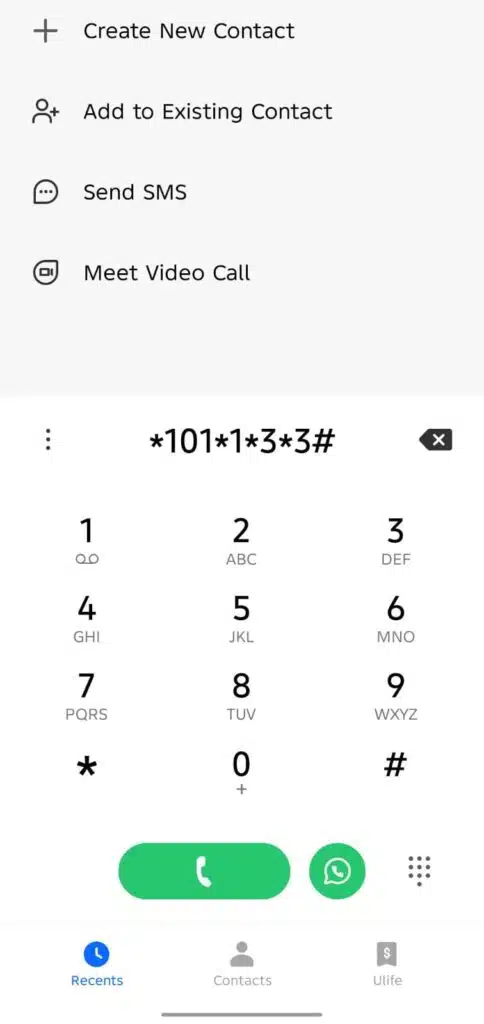
*101#*101*1*3*3#
Step-by-Step Guide
- Open the Phone Dialer on your mobile.
- Dial
*101#.
- Dial
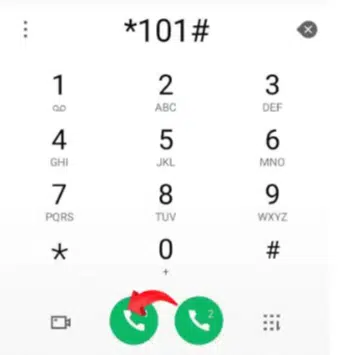
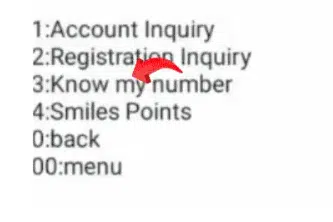
- Select Account Management and select 1, and press send.

- Select Account information, type 3, and click on send.
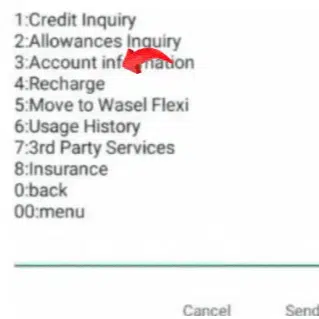
- Select Know my number and type 3 and click on send.
- Tap the Call button.
- Wait a few seconds.
- Your mobile number with Etisalat will be displayed on the screen.
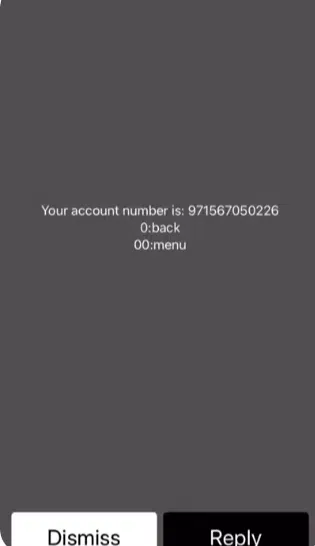
In case the number is not displayed, dial *101# and pick the menu on the screen.
Read Also: Etisalat Quick Pay UAE: No Login Recharge Guide (2026)
Using Direct Code
- Dial *101*1*3*3# and call on it, then the number will show.
Best For
Those who seek the answer in the shortest possible time but are not through with the use of data.
Method 2: Using the Etisalat Website
In case you want to use a browser or handle your account on the internet, this approach is beneficial.
Steps to Check via Etisalat Website
- Open a browser on your phone or computer.
- Visit the official Etisalat UAE website.

- Click on “My Account” or Sign In.
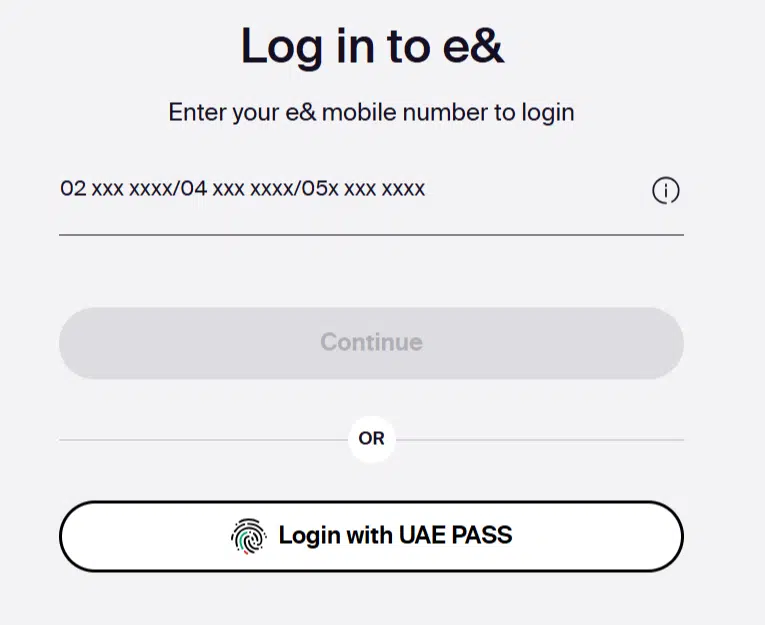
- Log in using your registered credentials. UAE Pass
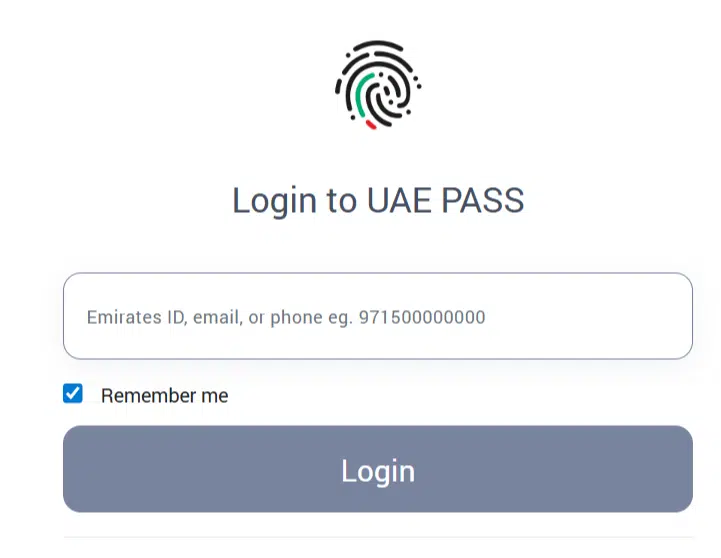
- After getting into the account, your Etisalat number is set to appear on the dashboard.
When This Method Is Helpful
- You manage multiple Etisalat lines
- You want to confirm that you are the owner of the account.
- You are already customers of the online services of Etisalat.
Method 3: Using the Etisalat App
It is the simplest way to do it if you use the Etisalat mobile application.
Steps to Check Using the Etisalat App
- Install the Etisalat application either in the Google Play Store or the Apple App Store.
- Open the app and log in.
- Your Etisalat number will be displayed on the home screen or on the profile section.
- Usage, billing, and balance details could also be viewed.
Advantages
- Easy interface
- Everything about the accounts is in a single location.
- Perfect for the frequent Etisalat customers.
Best For
The users who require a long-term option to manage their Etisalat account.
Comparison: Which Method Is Best?
| Method | Internet Needed | Speed | Ease |
|---|---|---|---|
| USSD Code | No | Very Fast | Easy |
| Etisalat Website | Yes | Medium | Moderate |
| Etisalat App | Yes | Fast | Very Easy |
Recommended: Use USSD code if you need your number instantly.
Common Problems and Solutions
USSD Code Not Working
- Check the network signal
- Restart phone
- Try the alternative code
App Login Issues
- Update the app
- Reset password
- Check the internet connection
Wrong Number Displayed
- Ensure the correct SIM slot
- Dual SIM phones may show different numbers
Frequently Asked Questions (FAQs)
What is the way to check my Etisalat number with no balance?
It can be checked through USSD code, which is absolutely free.
Is this applicable to prepaid and postpaid Etisalat SIMs?
Yes, all methods work for both.
Is it possible to check my Etisalat number when being offline?
Yes, the USSD method works offline.
What is the time to display the number of a new SIM?
Usually, 10–15 minutes after activation.
Read Also: Etisalat Customer Care UAE: Talk to a Live Agent Fast
Final Words
It is not that difficult to check your Etisalat number in a few seconds, provided you know how to do it. The USSD code is the quickest, the Etisalat application is the most comfortable, and the website is effective in managing the account.
Select the way of doing things that suits you and you will never have a problem with getting your Etisalat number back.